Skip to content

Features

Everything Classimum does, screen by screen.

Enrolments, scheduling, attendance, certificates, payments, prospecting, time tracking and payroll: every part of the centre shares the same student record. Here is each of them, with real screens taken from a demonstration centre with fictitious data.

New in September

What is arriving in your space in September

From staff requests to signed charters, by way of the parent space: what more Classimum does since September. Unless stated otherwise, a new feature is included in all plans.

For your team

  • Online requestsLeave, permissions, remote work, assignments and training: your team makes requests online, the decision is taken in one gesture from the alert, and everything is logged.Included in Growth, Pro 360 and Enterprise
  • Adjustable breaksA break for the centre, by period or specific to one employee, each with its effective date, deducted from the hours clocked.Included in Growth, Pro 360 and Enterprise
  • Exported summariesTime tracking, leave and days off-site, in Excel or PDF, for the team or for one person.Included in Growth, Pro 360 and Enterprise
  • Administrative documentsEmployment, salary or internship certificate, leave statement: the employee requests their document online, management or human resources issue it as PDF on your template.
  • Internal complaintsA team member reports a problem to management and follows its response; if they ask, the person concerned does not know who reported it.
  • Tasks between colleaguesGive a task to a colleague and follow it until it is done.
  • BirthdaysWith each person's consent, their birthday is shown to colleagues, who can leave them a message.
  • Workspace and remote workEveryone finds their day, their tasks, their requests and their documents; when remote work is granted, they start and finish their day there remotely.Remote work in Growth, Pro 360 and Enterprise

For your learners and your courses

  • Special needsHealth, disability or learning disorder noted in the record; the learner's trainers see them with their consent.
  • Session weatherThe forecast for your city, on in-room session days, over seven days.
  • Upcoming sessionsYour salespeople see the next start dates and their places, in a text ready for WhatsApp.
  • Certificates of attendanceDrawn from the roll call, on your template, ready to give to the learner.
  • Till receiptsA receipt printed at the counter at the time of payment, as a ticket or in A5.
  • Old certificatesYour certificates from before Classimum entered or imported from a spreadsheet, verifiable online and regenerated with the current template.
  • Adjustable verification pageYou choose what the public verification page shows; the national ID (CIN) and the date of birth on the certificate become optional.
  • Learner reviewsYour learners rate their completed courses; you reply to them from the space.
  • Signed chartersLearner, parent or trainer charter, signed by hand on the screen.

New features and new ways to choose

  • Parent spaceInvited by the centre, parents follow their children's schedule, attendance, payments and documents.Included in Growth, Pro 360 and Enterprise
  • Online CNFCPP fileAttendance sheets signed online by the learners and the trainer, FINC.02 programme form and FINC.03 attendance sheet for your funding files.Included in Pro 360 and Enterprise
  • Company relations (B2B)Contacts, exchanges, relationship stages, agreements drawn from your template and B2B space indicators.Included in Growth, Pro 360 and Enterprise
  • Certificate generator on its ownOnly need certificates? No subscription: in batches of 50, 200 or 500, or individually, on quote, 10 free certificates to start with.See the batches
  • Plan simulatorA few questions, and the cheapest plan that covers your needs.Find my plan

Management

The centre's day, on a single screen

Management sees what has been collected, what is expected, what is happening today and what is awaiting a decision.
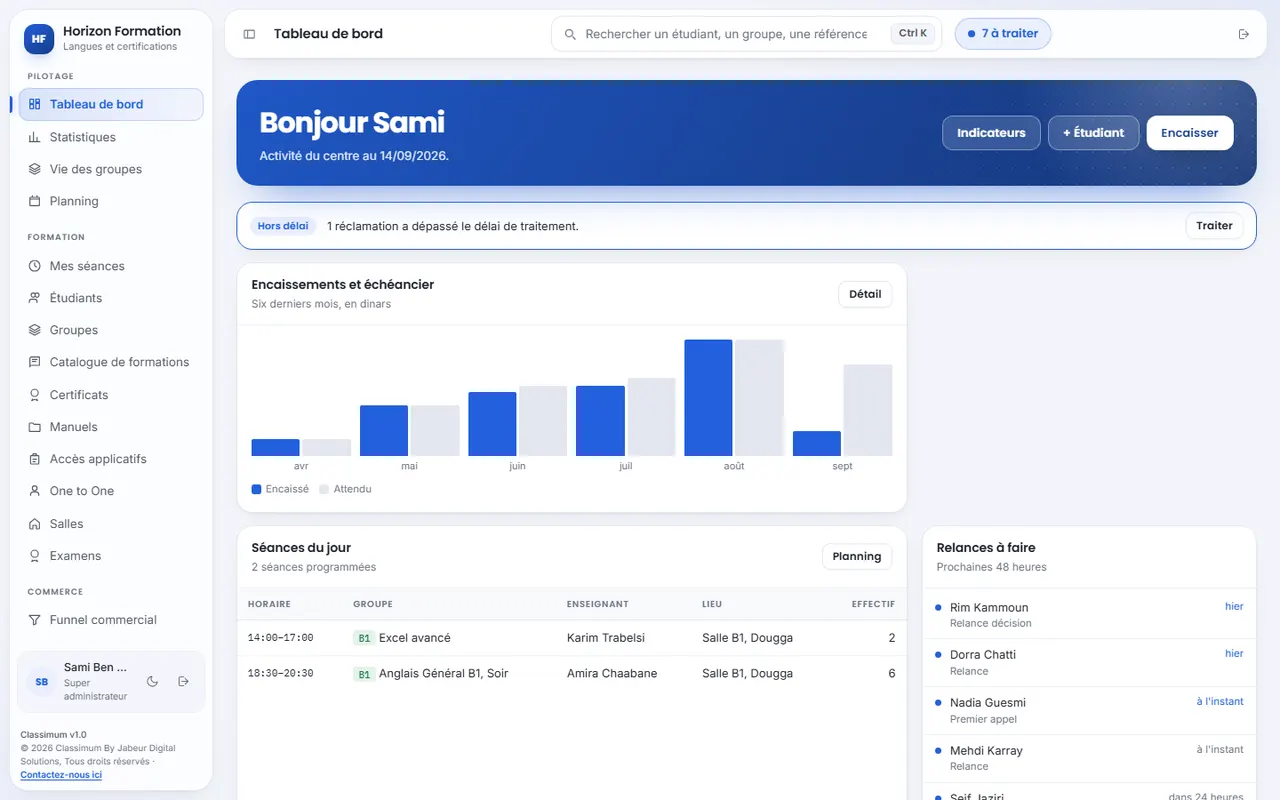
  • Collected versus expected month by month, over the last six months.
  • Today's sessions with the group, the teacher, the room and the headcount.
  • Follow-ups to do within 48 hours: prospects to call back, overdue instalments.
  • Alerts overdue complaints, missing clock-ins, attendance sheets not filled in.
The dashboard: payments over the last six months, today's sessions and follow-ups to do.

Students and enrolments

The whole student on a single record

An enrolment entered at reception feeds the group, the payment schedule and the statistics. Nobody re-enters anything.
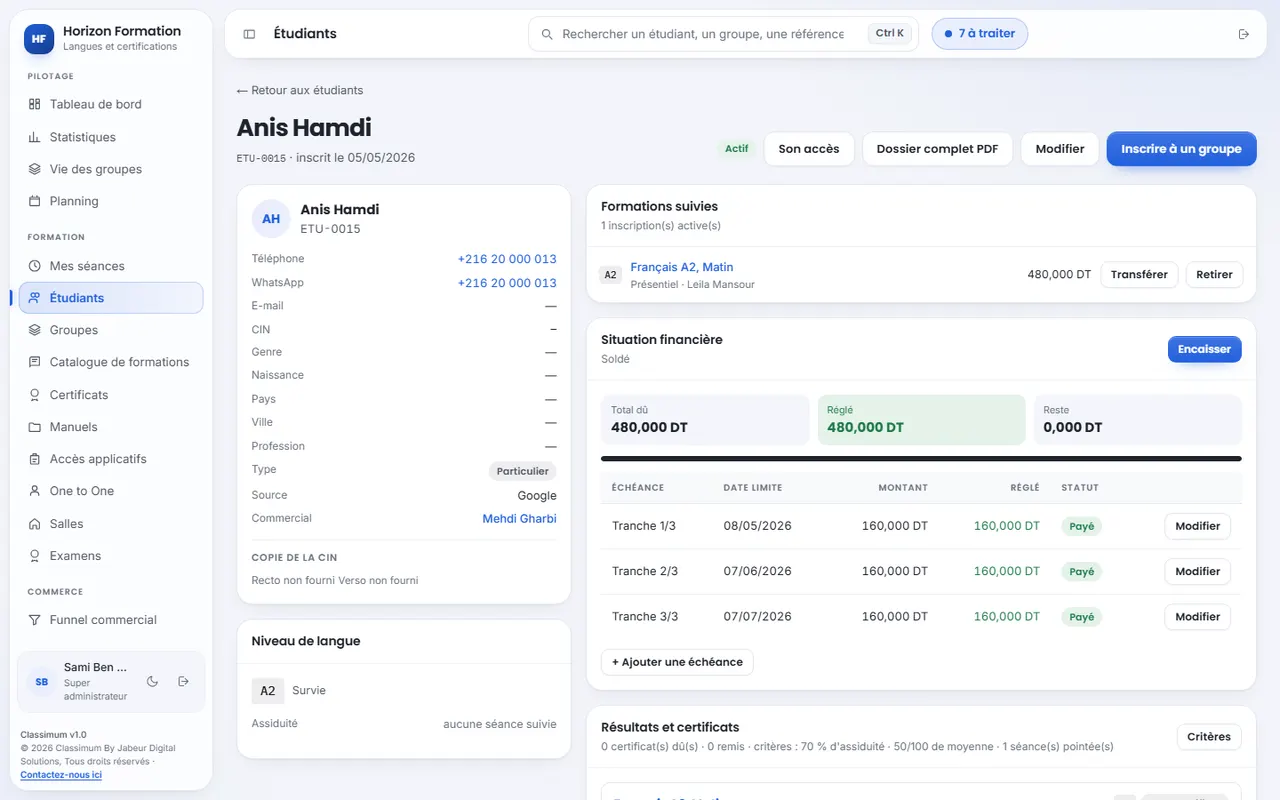
  • Complete record contact details, national ID (CIN), supporting documents, courses taken and history.
  • Special needs health, disability or learning disorder, what to do and emergency contact; the learner's trainers see them with their consent.
  • Duplicates detected on the national ID and the telephone number, before they clutter the database.
  • Import from a spreadsheet to bring in your Excel files when you start.
  • Level packs and complete record exportable as PDF.
A student's record: contact details, course taken and payment schedule.

Groups, scheduling and rooms

The schedule builds itself

You give the weekly timetable and the start date: sessions are calculated through to the end of the course.
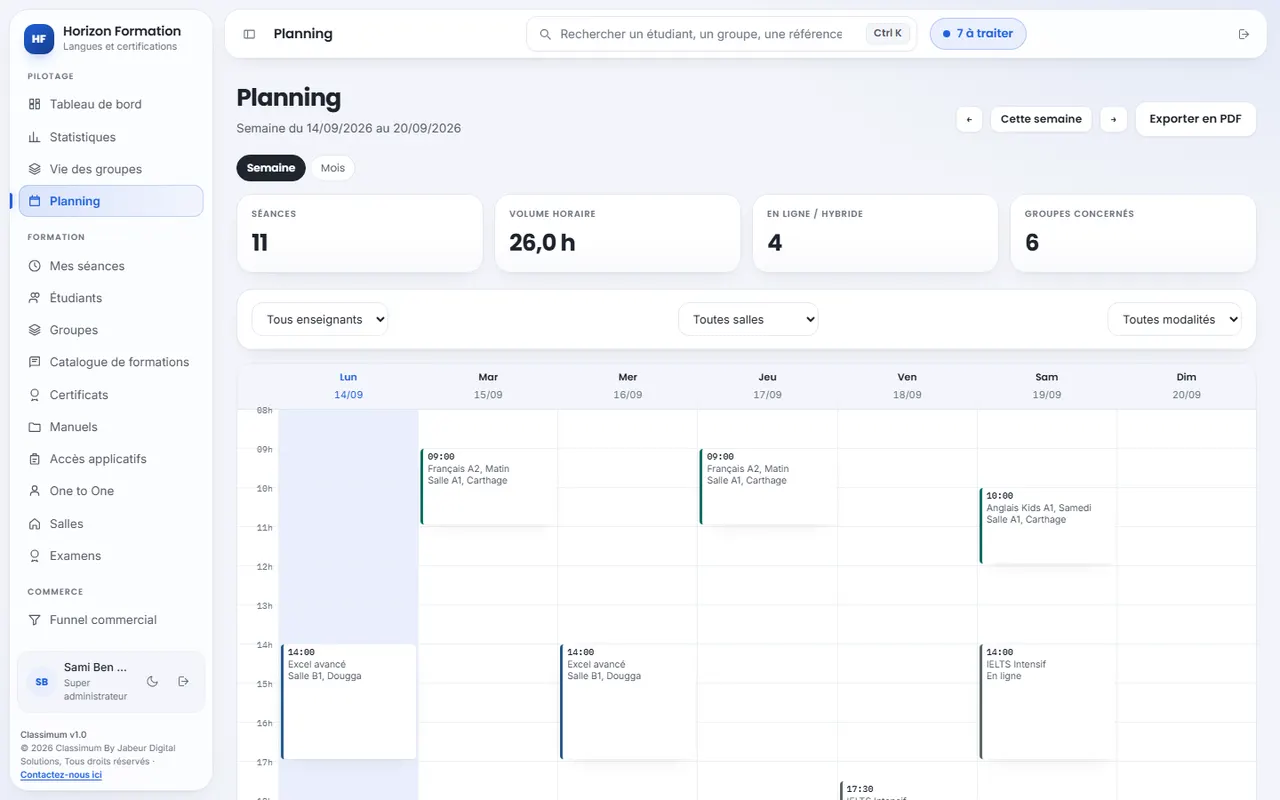
  • Sessions calculated from each group's timetable, with the number of hours.
  • Public holidays skipped and cancelled sessions rescheduled as make-up sessions.
  • Rooms without double booking in person or online, with the weather for the next seven days for in-room sessions.
  • Timetables as PDF by group, by teacher or by room, and One to One private lessons.
The week's schedule: sessions by room, teacher and format.

Teaching follow-up

From the first lesson to a verifiable certificate

Each group shows its progress, its attendance and its results. The certificate is issued when the criteria are met.
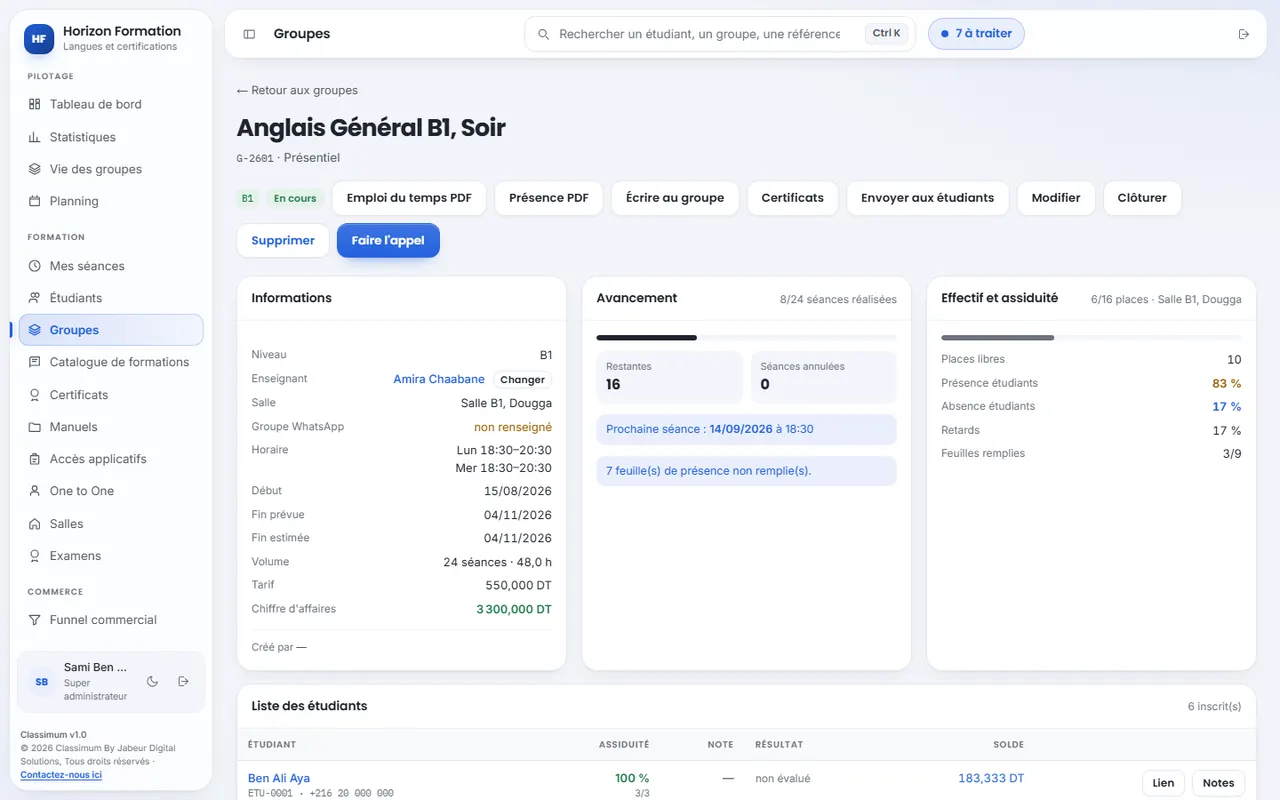
  • Roll call by the teacher, from the room, on a phone.
  • Progress and attendance sessions held, sessions remaining, attendance rate and lateness.
  • Exams, marks and transcripts with each student's results.
  • QR code certificates verifiable online by an employer, according to your attendance and average-mark criteria; your old certificates are added to them.
  • Certificates of attendance drawn from the roll call, on your template; learners who are up to date are ticked automatically.
A group's page: information, progress, attendance and list of students.

Payments

Every amount owed, tracked to the last

Payment schedules, receipts and reminders in one place: accounting knows who owes what, and since when.
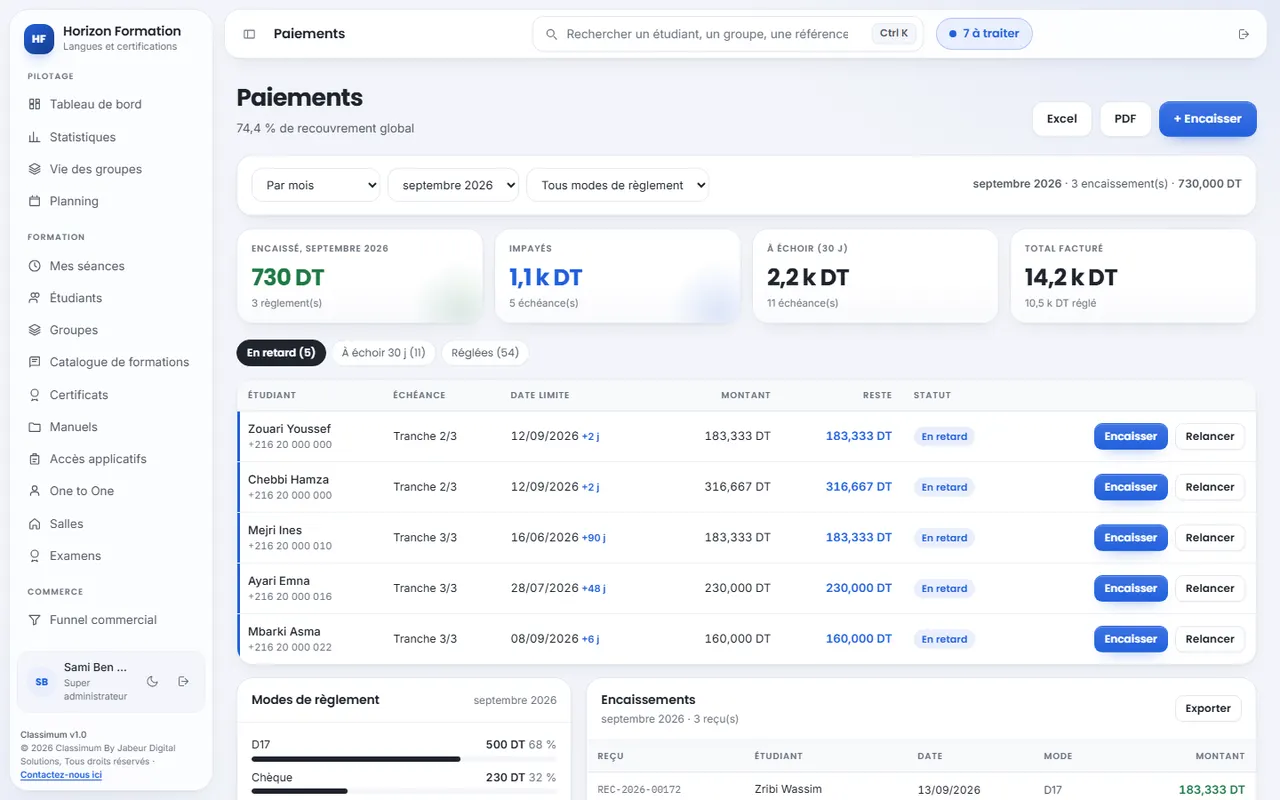
  • Payment schedules and numbered receipts given to the student and found again in their space.
  • Till receipt printed at the counter at the time of payment, as a ticket or in A5.
  • Collection and unpaid amounts visible at a glance, arrears sorted by age.
  • Reminders in one click by e-mail or WhatsApp.
  • Every means of payment cash, cheque, bank transfer, card, D17 and Flouci, Excel and PDF exports.
Payments: collection rate, unpaid amounts and instalments to chase.

Sales and key accounts

No enrolment enquiry lost ever again

Each prospect follows a funnel, from first contact to enrolment, with its dated follow-up.
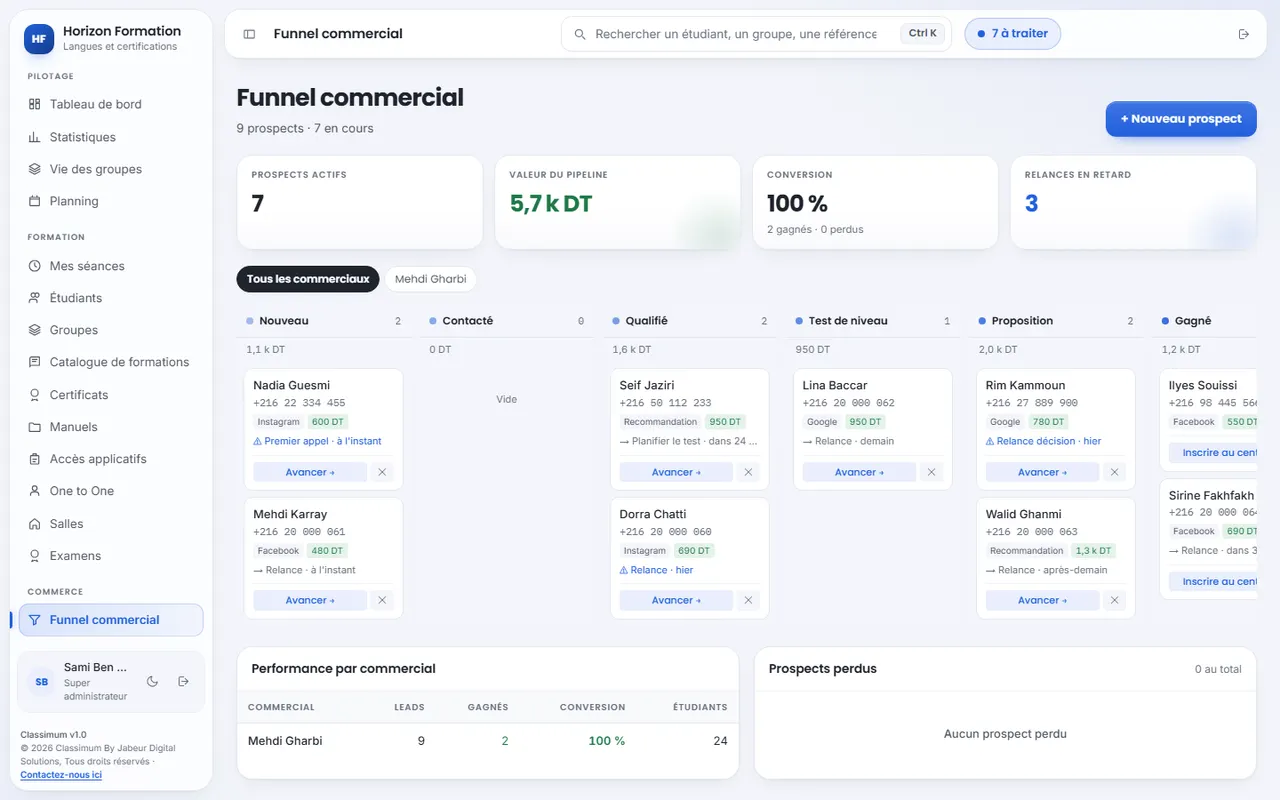
  • Funnel by stage new, contacted, qualified, level test, proposal, won.
  • Pipeline value and conversion by source: Facebook, Instagram, Google, referral.
  • Upcoming sessions dates, times and places left, in a text ready for WhatsApp.
  • Performance by salesperson targets and commissions.
  • Company relations client companies, contacts, exchanges, agreements drawn from your template and employees trained.
The sales funnel: prospects by stage, pipeline value and follow-ups.

Marketing platform

Your marketing team, in the same space as your enrolments

Campaigns, posts and visuals are prepared where prospects arrive: management sees how many enrolments each channel brings in, with no spreadsheets to cross-check.

  • Campaigns and spending budgets by channel, tracked links and QR codes, spending entered, imported from a CSV export or synchronised from Meta.
  • Editorial calendar by month, by week or as an agenda, each post approved by the team lead before it goes out.
  • Visual production requests to the designer or the video editor, versions, corrections and deadlines, filed in each person's tasks.
  • Acquisition analytics prospects, enrolments, cost per prospect and per enrolment, by channel and by campaign; CSV and PDF exports, Power BI and Excel feeds.
  • Monthly targets projected to the end of the month; everyone knows what the team sees of their work.
  • A ring-fenced role marketing passes its prospects on to sales without opening the CRM and sees neither the pupils' records nor their money; budgets and revenue stay with management, and with only the members it entrusts them to.

Included in Pro 360 and EnterpriseOr à la carte: see pricing
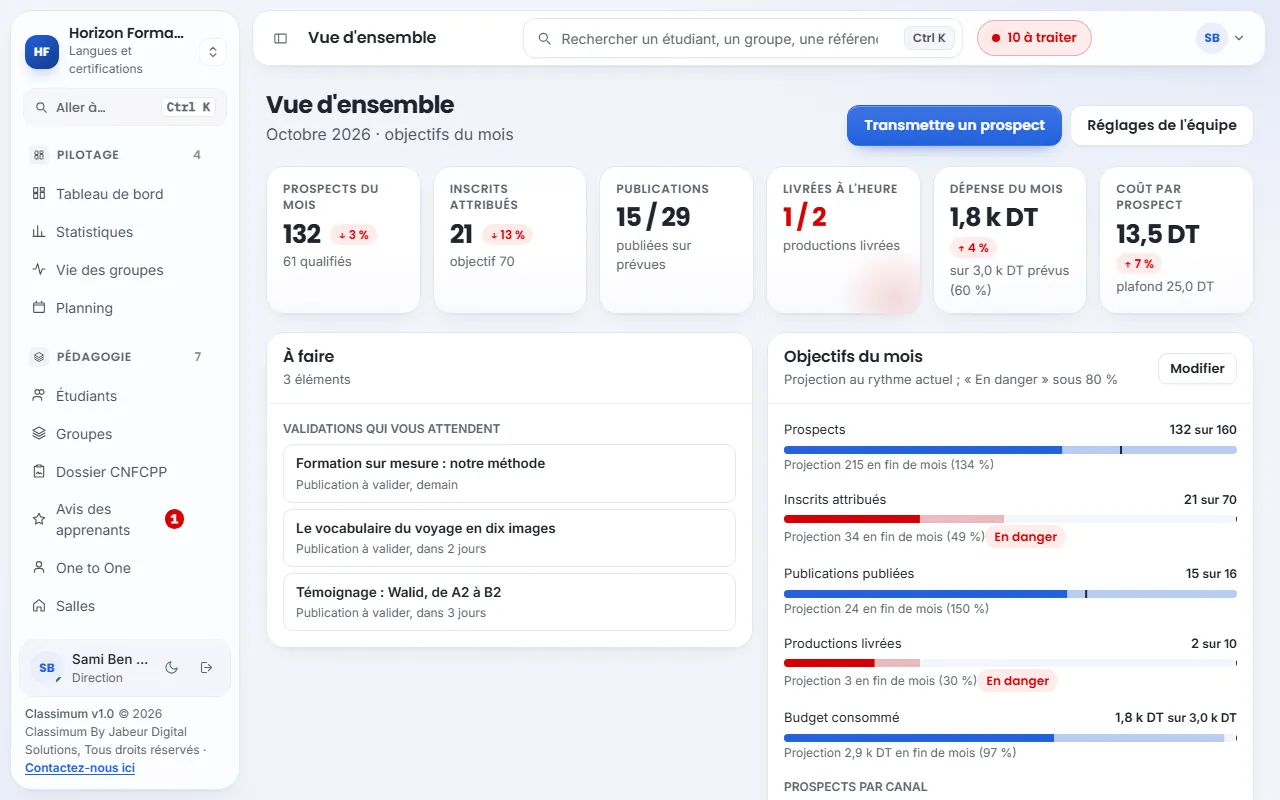
The marketing overview: prospects and enrolments for the month, posts, deliverables, spending, approvals to give and monthly targets.

Human resources

The administrative team, under control at last

Time tracking, leave and payroll take account of seasonal hours and Tunisian contracts.
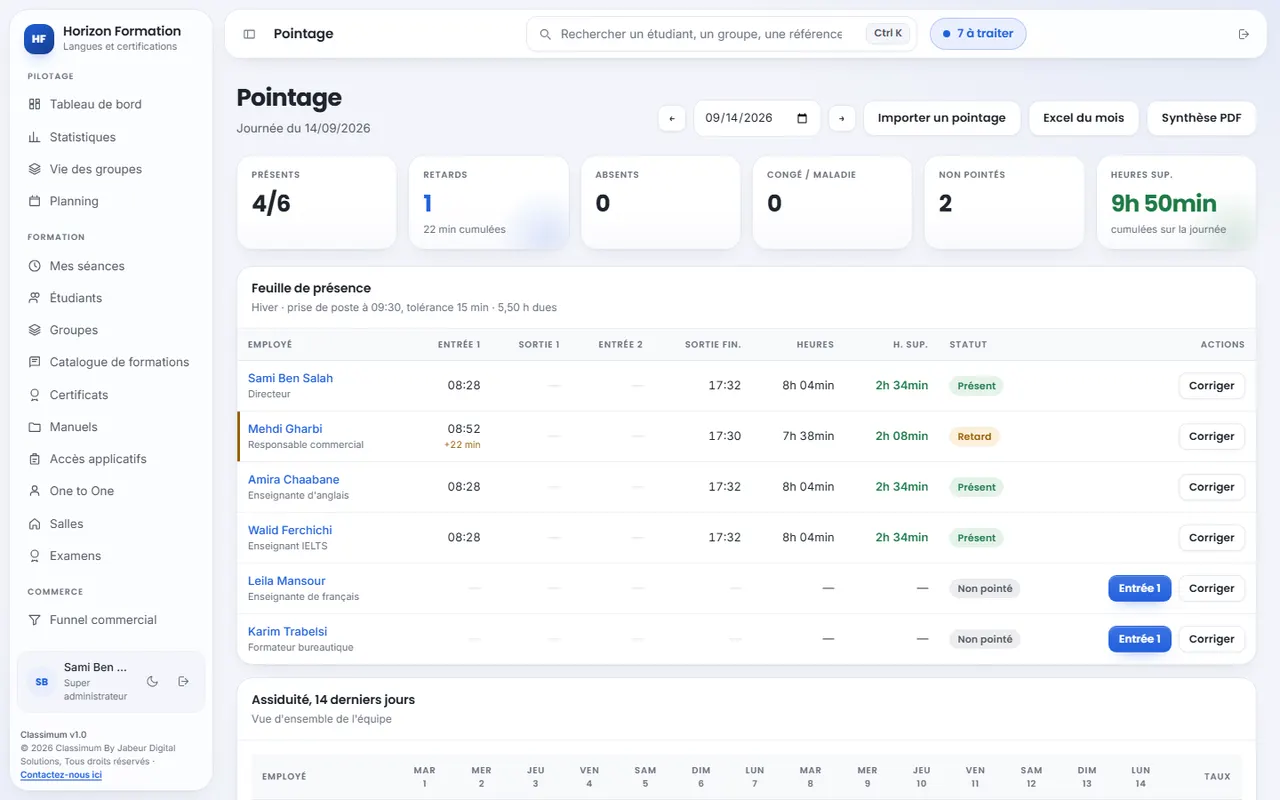
  • Time tracking entered or imported from the time clock, lateness and overtime calculated.
  • Seasonal hours and breaks start time, tolerance and break adjustable, for the centre or per employee.
  • Online requests leave, permissions, remote work, assignments and training, decided and logged.
  • Administrative documents employment or salary certificate requested online, issued as PDF on your template.
  • Payroll, bonuses and deductions payslips as PDF, for CDI, CDD, CIVP, Karama and freelance staff.
Time tracking: today's attendance sheet, lateness and overtime.

Statistics

Decide with figures, not guesswork

The centre's indicators are updated with every enrolment and every payment.
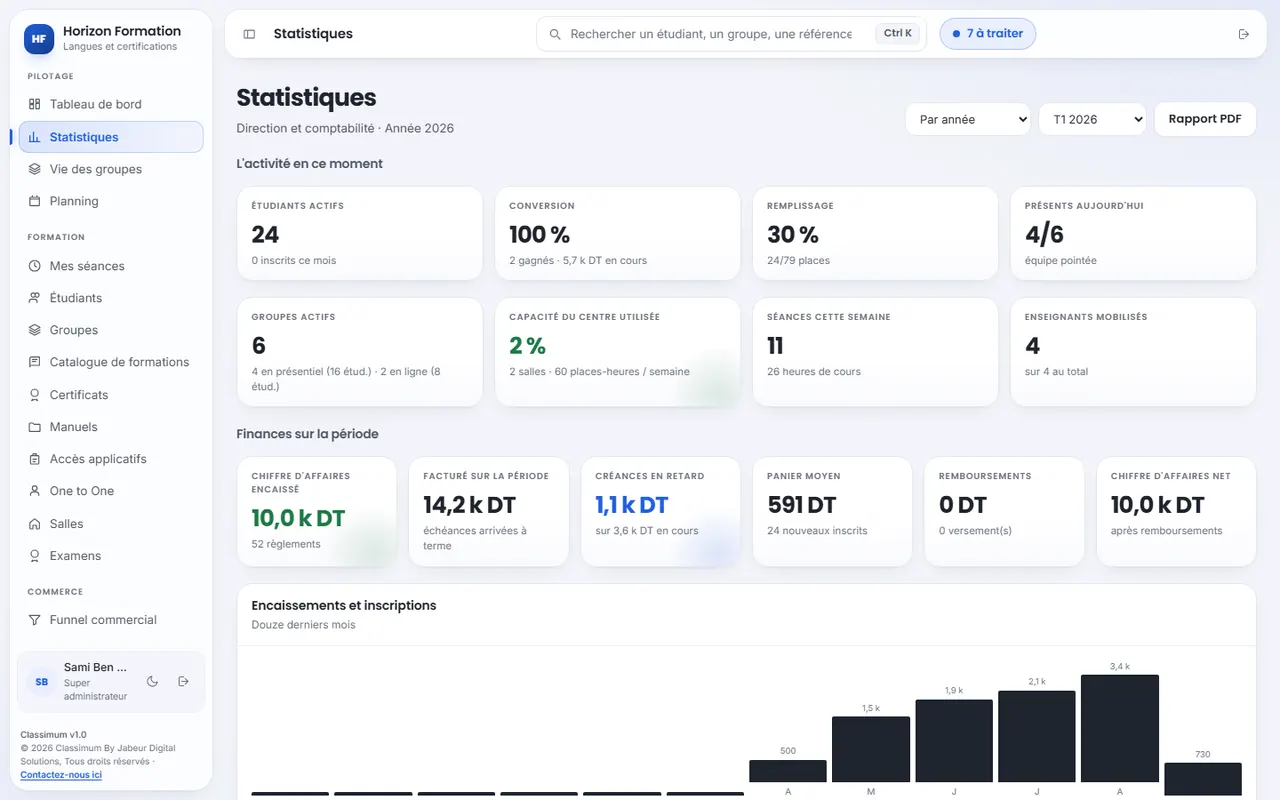
  • Revenue collected, instalments due and net of refunds, by period.
  • Overdue receivables and average spend per enrolment.
  • Occupancy of groups and rooms.
  • Learner satisfaction drawn from their reviews of completed courses.
  • Management report exportable as PDF.
Management statistics: revenue, receivables and occupancy.

Learner, parent and mobile spaces

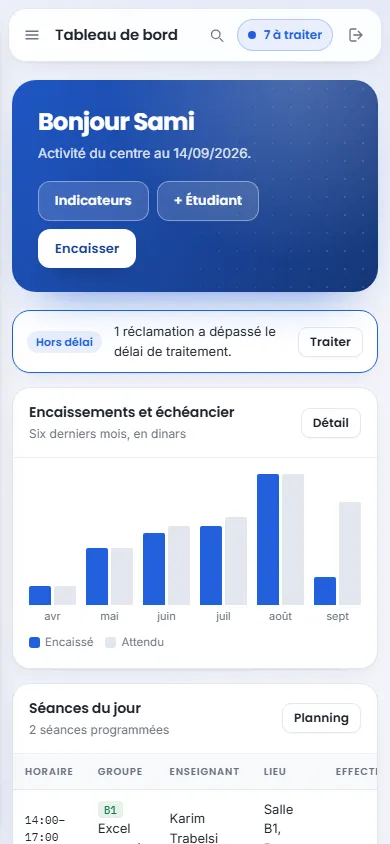
A browser is all you need, even on a phone

Nothing to install. Management follows the centre from anywhere, the teacher takes the roll from the room, the learner and their parents find everything in their space.
  • Learner space timetable, recorded sessions, receipts, transcripts and certificates, reviews of their courses and signed charter.
  • Parent space the child's schedule, attendance, payments and documents, on invitation from the centre. Included in Growth, Pro 360 and Enterprise.
  • The centre's contact details WhatsApp, website and social networks, within the learner's reach.
  • In the centre's colours your logo and your colours, everywhere.
  • On every screen computer, tablet and phone, with a thumb-friendly navigation bar.
  • Updates included with no action needed on your part.
The Classimum dashboard on a phone.

And also

What saves time every day

Complaints

Each complaint tracked with a handling deadline, and an alert when it is exceeded.

Library and textbooks

Course materials and textbooks filed by course, accessible to the right roles.

Internal announcements

A message shown at the top of the team's screen, targeted by role.

Course catalogue

Fields, levels, hours and prices, carried over at enrolment.

Application access

The login details for the platforms used in class, given to each student.

Showcase website as an option

Your courses online, enquiries arrive in the funnel, Facebook Pixel and visit statistics.

Trainer directory as an option

Trainers approved by Classimum, searched by speciality and by city. Collaboration, shared CNFCPP CV, added to the team in one click.

Trainer space

Free for the trainer: their profile, their proposals and their notifications. A single account to work with several centres.

Our partners

Negotiated offers for centres and their teams, directly in the management space.

Notifications

Trainers' replies, shared CVs, unpaid amounts and sessions to check in: everyone is told about what concerns them.

E-mails from your addresses

As an option: your messages are sent from support@yourcentre.com, verified domain, your brand in every inbox.

Build my pack

Access to the platform and only the features you use, or business packs that tick them all at once.

Security and trust

Your pupils' data, protected and yours

Ten ring-fenced roles
The server only sends each person the data of their role: the teacher sees neither the finances nor a health need without the learner's consent; marketing sees neither the pupils' records nor their money.
Each centre isolated
In the database itself, not just on screen.
Two-factor authentication
A code on the phone in addition to the password, with backup codes.
Files checked
Images and PDFs checked on upload, booby-trapped content rejected.
Hosted in Europe
Servers in Paris, encrypted exchanges (HTTPS).
Your data belongs to you
Full export at any time, deletion on request.

By plan

What each plan includes

Unlimited trainers in all plans. Details of prices, options and packs are on the pricing page.

FeatureStarterGrowthPro 360Enterprise
Students, groups, scheduling, rooms, One to One✓✓✓✓
Payments, receipts, payment schedules and reminders✓✓✓✓
Exams, transcripts, QR code certificates and attestations✓✓✓✓
Learner space, library and announcements✓✓✓✓
Learner reviews and signed charters✓✓✓✓
Staff documents, internal complaints and tasks✓✓✓✓
Sales funnel and company relations (B2B)—✓✓✓
Complaints with deadline alert—✓✓✓
Time tracking, breaks, leave and online requests—✓✓✓
Textbooks and application access—✓✓✓
Parent space—✓✓✓
Full statistics—✓✓✓
Payroll, bonuses, deductions and payslips——✓✓
Online CNFCPP file——✓✓
Marketing platform: campaigns, calendar, production and analytics——✓✓
Advanced management statistics——✓✓
Multiple centres and custom integrations———✓
Showcase website, e-mails from your addressesoptionoptionoptionoption
Trainer directoryoptionoptionoptionoption
Partner offers and notifications✓✓✓✓
Learners · administrative accounts200 · 3700 · 102,000 · 25no cap
WhatsApp